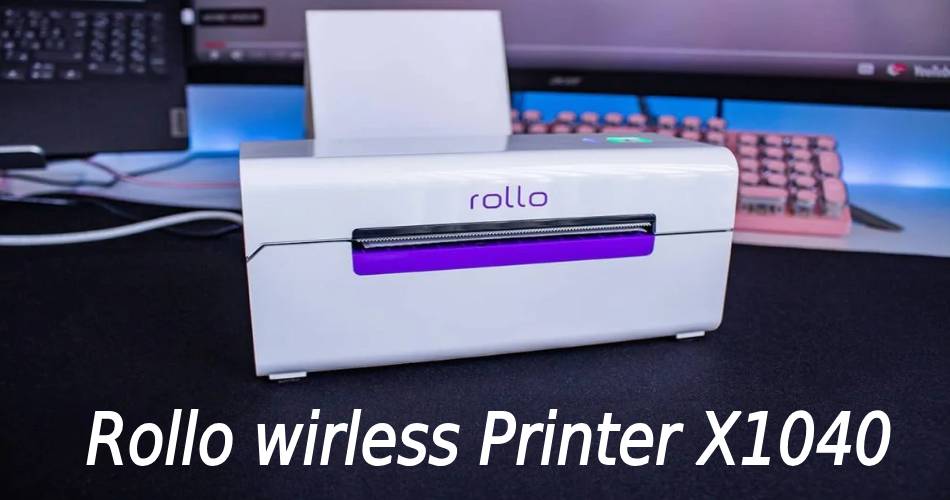
You get to see many more features in the Rollo wireless printer X1040. It would help if you had a stable and high-speed internet connection for printing. It works with your mobile phone also and it automatically recognizes the system also.
It is budget-friendly and ink-free, and you can even use it very easily. This printing device is small in size and controlled through the cloud ship manager application and software that can be easily installed on both mobile and laptop.
So, in this article, we are going to discuss or review the incredible printer in detail, along with its features and functions.
Features of Rollo Wireless Printer X1040:
In This Article
Below are some features of the rollo wireless printer X1040. So you can check it out.
- Now, the printer prints wirelessly from your computer or mobile device.
- The printer prints 4 inches per second, making it one of the fastest on the market.
- In the printer, you get to see the thermal printing technology.
- Next, the printer automatically recognises label size and changes settings.
- Lastly, the printer can handle four label rolls, reducing label replacements.
First Impressions and Set-Up Rollo X1040
Here, the box with your wireless printer comes with the minimum of what you need but is well-packed, and you will get
- Firstly, your Rollo Wireless Printer
- Then, a warranty Information
- Instructions For Setup of the printer.
- Then, a power Adaptor
- You will also get a USB Connector in the event that you want to connect to your computer.
- Then you get to see a small Stack Of Labels so you can get started and set things up right away.
Set Up Your Rollo Printer In 5 Steps:
To set up your Rollo printer, you need to follow the simple steps given here.
First, Plug your printer in and turn it on.
When you plug in your printer, the lights will flash, and it will start looking for Wi-Fi networks to connect to.
Download the Rollo App.
You can download the Rollo app from both Windows and Mac.
Connect the printer to your wireless network using the app.
By using the app, it will give you a step-by-step for connecting and will do all the heavy lifting in the background.
Set Up a Rollo Account.
Now, you can easily do it in the app or on their website.
Go to Add a Printer/Device on your computer to connect to the printer.
There are no drivers to install, so connection over your wireless network (not by Bluetooth) is a quick and easy process. If you are printing from your phone, you do not have to worry about this step.
And if you are ready to print! Then, you can immediately start printing labels from either your computer or by using your phone.
Pros Of Rollo Wireless Printer X1040
Below are some pros of the rollo wireless printer X1040. You can check it out.
- Firstly, you get an option to use Rollo Ship Manager to generate labels with shipping discounts.
- Then, the printer comes equipped with a Wi-Fi connection for printing on tablets, phones, and PCs.
- This printer can print labels from 1.57 to 4.1 inches wide.
- The Rollo Wireless printer uses non-proprietary labels, which can be easily loaded without any waste.
- Next, this printer has color-coded status indicators for troubleshooting.
- Lastly, it is very convenient and quick to set up.
Cons Of Rollo Wireless Printer X1040
Below are some cons of the wireless printer X1040. You can check it out.
- Firstly, this printer does not come with a dedicated app for printing or designing labels.
- Then you get this printer at discounts only on USPS and UPS ship managers, not on FedEx service providers.
Rollo X1040 Specifications.
Following are some Rollo X1040 specifications that you can check out.
- Printing Method: Direct Thermal
- Resolution: 203 dpi
- Max Printing Speed: 5.9″ per second (150 mm/s)
- Max Paper Width: Variable 1.57″ – 4.1″ (48 – 108 mm)
- Paper Thickness: 0.08 – 0.2 mm
- Paper Height: Up to 12″
- Supported Paper: You get direct Thermal Labels / Direct Thermal Paper
- Power Adapter: 24 V / 2.5A
- Printing Life: About 650,000 Labels
- Supported Operating Systems: It supports iOS / iPad, Android, macOS, Windows, ChromeOS, Linux
- Connection: wifi and USB for Printing/wifi, USB, Bluetooth for Setup
- Weight: 2 lbs (1kg)
- Dimensions: 7.08″ X 3.54″ X 3.15″ (180 mm X 90 mm X 80 mm)
- Manufacturer Warranty: One year from the date of purchase
- Returns: If you purchase it directly from Rollo, you can return it in 30 days and get your Money Back.
- Price: $279.99 (Rollo.com*) / ($299 on Amazon)
Frequently Asked Questions (FAQ’s).
Is Rollo A Good Label Printer?
Rollo will be the best choice for you if you are someone who prints a lot of labels regularly. After this, the Rollo printer is also very inexpensive compared with other label prints of different brands. So Rollo brand helps you with tips on getting free labels and also sells its brand labels at a very low cost, and it’s good for label printers.
Can Rollo printer print wirelessly?
Yes, the Rollo printer can print wirelessly. Now, the Rollo wireless printers are verified by Air Print as wireless printing devices. This device can easily be connected to wifi, USB, and Bluetooth connections.
Will your phone work with a Rollo printer?
Now, the Rollo printers work with phones. Here, the wireless Rollo printer is Air Print certified, so it works with all operating systems and iOS and Android devices like iPhones and iPads
Do I need wifi for Rollo?
Yes, it would help if you had a wifi connection for Rollo. So, the Wi-Fi printing makes the printer compatible with macOS, Windows, Android, iOS, Linux, and Chromebooks without the need to install drivers.
Will the Rollo printer need ink?
Here, It does not need any ink or cartridges. You get this printer budget-friendly and ink-friendly because it has no operating or maintenance expenditures.
How Much Does The Rollo Printer Ink Last?
The Rollo printer does not require any ink/ cartridge. So Rollo printers have basically no operating costs and maintenance costs. Here, it is very budget and ink-friendly.